> ## Documentation Index
> Fetch the complete documentation index at: https://docs.narada.ai/llms.txt
> Use this file to discover all available pages before exploring further.
# Document Analyzer
> Query and extract information from documents using natural language
# Document Analyzer
**Document Analyzer** is a powerful tool that enables you to query and extract information from documents. Whether you're looking to summarize content, extract specific data points, or understand complex material, Narada's analyzer can interpret your natural language instructions to provide the insights you need.
## Overview
Narada's Document Analyzer is a powerful tool that enables you to query and extract information from documents. Whether you're looking to summarize content, extract specific data points, or understand complex material, Narada's analyzer can interpret your natural language instructions to provide the insights you need.
## Using the Document Analyzer
Provide the document you want to be analyzed by clicking the attachment button on the bottom left corner of the chat window.
Multiple document formats are supported for comprehensive analysis.
Ask specific questions or make requests about the document using natural language.
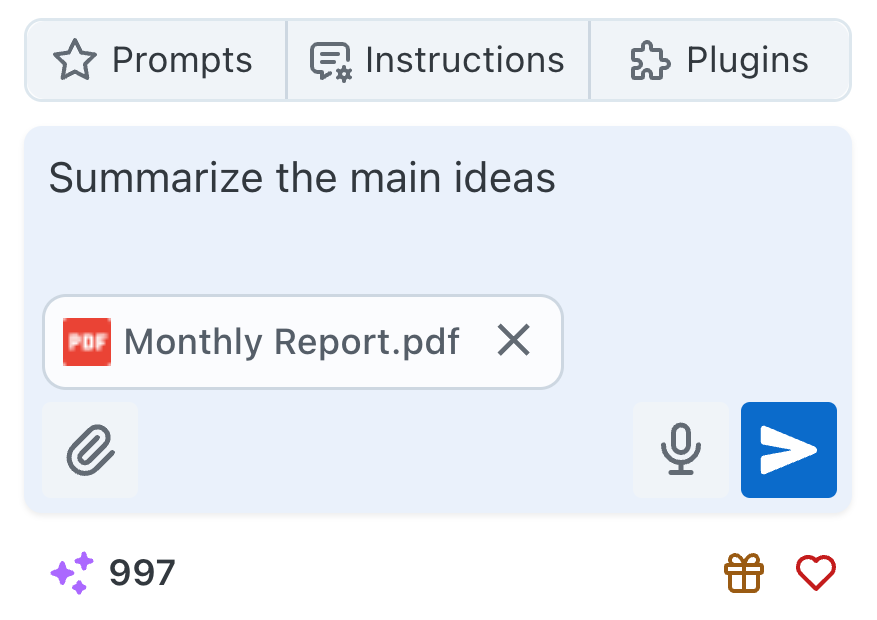 Narada will process your request using its document analyzer capabilities and provide you with the information or summary you asked for.
## Supported Document Types
**Text-Based Files**
* **PDF files** - Documents, reports, manuals
* **Word documents (.docx)** - Proposals, contracts, letters
* **Text files (.txt)** - Plain text documents, notes
* **PowerPoint presentations (.pptx)** - Slides, presentations, proposals
**Data Files**
* **Excel files (.xlsx)** - Spreadsheets, financial data, lists
* **CSV files** - Data exports, contact lists, analytics
* **TIFF files** - Scanned documents, technical drawings
**Visual Documents**
* **Image files** (JPG, PNG, GIF) - Screenshots, charts, diagrams
* **Scanned documents** - Paper documents converted to images
* **Charts and graphs** - Visual data representations
## Analysis Capabilities
Generate comprehensive summaries of long documents
Extract specific information, dates, numbers, and key facts
Answer specific questions about document content
Understand tables, charts, and structured data within documents
## Query Examples
**Document Summaries**
```
"Summarize the main points of this report"
```
```
"What are the key findings in this research paper?"
```
```
"Give me an executive summary of this proposal"
```
**Specific Information**
```
"Extract all dates and events mentioned in this document"
```
```
"Find all contact information in this file"
```
```
"List all financial figures mentioned"
```
**Targeted Queries**
```
"What are the risks identified in this contract?"
```
```
"How does this year's performance compare to last year?"
```
```
"What recommendations are made in the conclusion?"
```
## Advanced Features
**Analyzing Multiple Documents**
Upload multiple related documents to:
* Compare information across documents
* Find connections and relationships
* Generate comprehensive insights from multiple sources
* Identify discrepancies or contradictions
**Understanding Document Structure**
Narada recognizes and interprets:
* Tables and spreadsheet data
* Charts and graphs
* Headers and sections
* Lists and bullet points
* Footnotes and references
**Intelligent Understanding**
The analyzer provides:
* Context-sensitive interpretations
* Understanding of domain-specific terminology
* Recognition of document types and purposes
* Appropriate response formatting based on query type
## Document Size and Limitations
Narada can handle documents up to 20MB in size. For optimal performance,
consider breaking very large documents into smaller sections if detailed
analysis is needed.
Maximum file size: **20MB per document**
Larger documents may take longer to analyze - typically a few seconds to
minutes
More specific queries yield better, more targeted results
## Best Practices
Ask specific questions for more accurate and relevant responses
Higher quality documents (clear text, good scans) produce better results
Provide context about what you're looking for to get targeted insights
Start with broad questions, then drill down into specific details
## FAQs and Troubleshooting
**Q: Can Narada analyze any document type?**
A: Narada can analyze .csv, .docx, .pdf, .pptx, .txt, .tiff, .xlsx, and any image files.
**Q: Is there a limit to the size of the document Narada can analyze?**
A: Narada can handle documents up to 20MB in size.
**Q: How specific do my queries need to be?**
A: The more specific your query, the better Narada can provide accurate and relevant information. Vague queries may lead to broad results, so clarity is key.
**Q: How is my document data handled?**
A: Documents are processed securely and are not stored after analysis. Narada maintains strict privacy and security standards for all uploaded content.
If your question isn't covered here, our support team at
[support@narada.ai](mailto:support@narada.ai) is always eager to help.
***
Narada's Document Analyzer is designed to enhance your productivity and understanding by providing deep insights into your documents. If you encounter any issues or have further questions, please don't hesitate to reach out. We're here to ensure your experience is as efficient and informative as possible.
Narada will process your request using its document analyzer capabilities and provide you with the information or summary you asked for.
## Supported Document Types
**Text-Based Files**
* **PDF files** - Documents, reports, manuals
* **Word documents (.docx)** - Proposals, contracts, letters
* **Text files (.txt)** - Plain text documents, notes
* **PowerPoint presentations (.pptx)** - Slides, presentations, proposals
**Data Files**
* **Excel files (.xlsx)** - Spreadsheets, financial data, lists
* **CSV files** - Data exports, contact lists, analytics
* **TIFF files** - Scanned documents, technical drawings
**Visual Documents**
* **Image files** (JPG, PNG, GIF) - Screenshots, charts, diagrams
* **Scanned documents** - Paper documents converted to images
* **Charts and graphs** - Visual data representations
## Analysis Capabilities
Generate comprehensive summaries of long documents
Extract specific information, dates, numbers, and key facts
Answer specific questions about document content
Understand tables, charts, and structured data within documents
## Query Examples
**Document Summaries**
```
"Summarize the main points of this report"
```
```
"What are the key findings in this research paper?"
```
```
"Give me an executive summary of this proposal"
```
**Specific Information**
```
"Extract all dates and events mentioned in this document"
```
```
"Find all contact information in this file"
```
```
"List all financial figures mentioned"
```
**Targeted Queries**
```
"What are the risks identified in this contract?"
```
```
"How does this year's performance compare to last year?"
```
```
"What recommendations are made in the conclusion?"
```
## Advanced Features
**Analyzing Multiple Documents**
Upload multiple related documents to:
* Compare information across documents
* Find connections and relationships
* Generate comprehensive insights from multiple sources
* Identify discrepancies or contradictions
**Understanding Document Structure**
Narada recognizes and interprets:
* Tables and spreadsheet data
* Charts and graphs
* Headers and sections
* Lists and bullet points
* Footnotes and references
**Intelligent Understanding**
The analyzer provides:
* Context-sensitive interpretations
* Understanding of domain-specific terminology
* Recognition of document types and purposes
* Appropriate response formatting based on query type
## Document Size and Limitations
Narada can handle documents up to 20MB in size. For optimal performance,
consider breaking very large documents into smaller sections if detailed
analysis is needed.
Maximum file size: **20MB per document**
Larger documents may take longer to analyze - typically a few seconds to
minutes
More specific queries yield better, more targeted results
## Best Practices
Ask specific questions for more accurate and relevant responses
Higher quality documents (clear text, good scans) produce better results
Provide context about what you're looking for to get targeted insights
Start with broad questions, then drill down into specific details
## FAQs and Troubleshooting
**Q: Can Narada analyze any document type?**
A: Narada can analyze .csv, .docx, .pdf, .pptx, .txt, .tiff, .xlsx, and any image files.
**Q: Is there a limit to the size of the document Narada can analyze?**
A: Narada can handle documents up to 20MB in size.
**Q: How specific do my queries need to be?**
A: The more specific your query, the better Narada can provide accurate and relevant information. Vague queries may lead to broad results, so clarity is key.
**Q: How is my document data handled?**
A: Documents are processed securely and are not stored after analysis. Narada maintains strict privacy and security standards for all uploaded content.
If your question isn't covered here, our support team at
[support@narada.ai](mailto:support@narada.ai) is always eager to help.
***
Narada's Document Analyzer is designed to enhance your productivity and understanding by providing deep insights into your documents. If you encounter any issues or have further questions, please don't hesitate to reach out. We're here to ensure your experience is as efficient and informative as possible.